Desktop assistant for interviews and meetings.
Ghost Writer is a desktop beta for high-stakes interviews. Get character-by-character AI answers streamed directly to your phone while keeping your PC completely clean.
See it in action
Experience the power of real-time stealth intelligence.
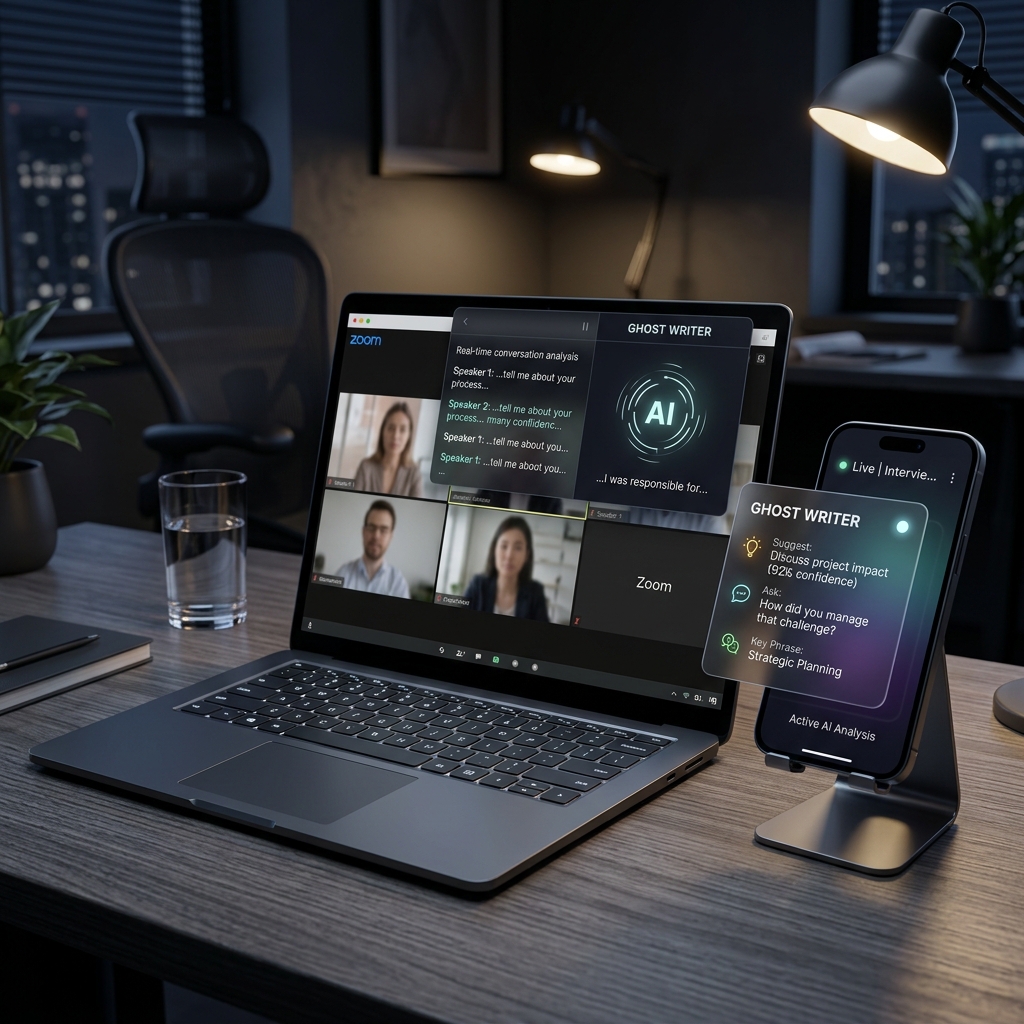
The Stealth Advantage
Ghost Writer handles complex technical conversation analysis while streaming character-by-character intelligence directly to your mobile device. Zero footprint, total confidence.
Designed for Total Stealth.
Traditional overlays can be detected. Ghost Writer bypasses this by streaming live intelligence to a secure mobile viewer on your side-device.
- PIN-Protected authentication handshake
- Real-time character streaming (No delay)
- Complete PC overlay minimization while active
Locked Session
Enter 4-digit PIN to view answers
Quick Setup Guide
Launch Ghost Writer in under 3 minutes.
Install
Run the one-command installer below to deploy Ghost Writer to your local user directory.
Configure
Launch the app, enter your API keys (Gemini, Claude, or local Ollama), and upload your context documents.
Sync
Scan the QR code with your phone to open the Stealth Remote Display. You are now ready for your meeting.
Windows x64
powershell -NoProfile -ExecutionPolicy Bypass -Command "irm https://raw.githubusercontent.com/lazylabsai/Ghost_Writer/main/install.ps1 | iex"
macOS arm64
curl -fsSL https://raw.githubusercontent.com/lazylabsai/Ghost_Writer/main/install.sh | bash
Context Grounding
Feed the AI your project documents, codebases, or meeting notes. Ghost Writer understands your specific technical environment for more accurate answers.
Voice Capture
High-fidelity real-time transcription powered by Whisper. Capture every word without context loss, even in noisy environments.
Hybrid Intelligence
Switch between global leaders like Gemini and Claude, or run fully local models for 100% data privacy.
Stealth Sync
Bridge your intelligence directly to a mobile device with a zero-footprint local sync that keeps your PC screen completely clean.
Command Center & Guide
Master the stealth actions that power Ghost Writer.
Keyboard Shortcuts
Full Action Guide
1. Stealth Initialization
Launch Ghost Writer and immediately press Ctrl+B to hide the overlay. Use the PWA Sync on your phone to keep your primary screen 100% clean during high-stakes calls.
2. Context Grounding
Drag your architectural diagrams, project requirements, or technical docs into the grounding zone (Settings -> Grounding) to ensure AI responses are mathematically aligned with your current task.
3. Real-Time Logic Injection
When a complex question arises, hit Ctrl+J. This triggers our reasoning chain (Gemini 1.5 Flash/Pro) to analyze the latest screenshots and Whisper-transcribed audio simultaneously.
Available Everywhere.
Native desktop performance for Windows x64 and macOS silicon, with a browser-based remote viewer for any smartphone.
What to expect in beta
v1.0.0 is a security-hardened desktop beta with a focus on stealth and undetected operations.
How is data handled?
Credentials are stored with OS secure storage when available. Cloud providers only receive requests when you configure and use them.
What if install warnings appear?
v1.0.0 is unsigned. Use the published checksum to verify the download, then follow the troubleshooting guide for platform-specific launch prompts.
Our Recommendations
For the best stealth experience, we recommend using Gemini 1.5 Flash for lightning-fast character streaming and ensuring your session PIN is updated frequently.
Where do I get support?
For all questions or technical support, contact us directly at lazylabs.26@gmail.com